
A CertKit is a dynamic, unique, 1-click certification preparation product including:
- e-learning (365 days from first activation).
- Online mentor (when available 365 days from first activation).
- Practice test (60 days from first activation).
- Tips, Tricks & Links (when available 365 days from first activation).
How to redeem a Certkit
To redeem your Certkit, please follow these steps:
1) Log in to measureup.com using your credentials
2) On the left menu, click on MeasureUp Learn
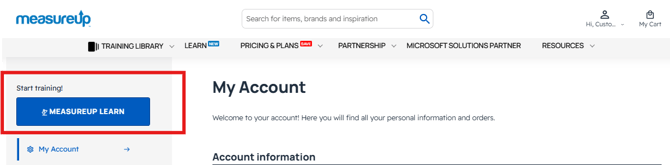
|
IMPORTANT: If you obtained the activation key for a practice test from another provider, simply go to the corresponding URL and log in with your credentials.
SERVICENOW UNIVERSITY: https://account.measureup.com/servicenow-universityPEARSON VUE: https://marketplace.measureup.com The following steps will be exactly the same as usual.
|
3) On the left menu, click on Product registration
4) Enter your Product Key, read and accept the Terms & conditions, and click on the Register
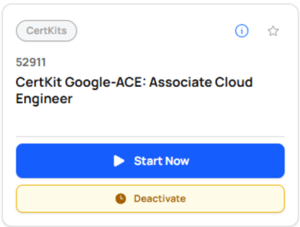
5) Click on the Start Now button to link to our partner.

How long can I access the different components within the Cert Toolkit?
- E-LEARNING: The student has access to the e-learning for 365 days – counting from the first time of activation.
- EXAM QUIZ: There is access for 90 days from first activation.
- ONLINE MENTOR: There is access to the mentor for 90 days, from first activation.
- EXAM SIMULATION: The student has access to the practice test for 60 days, from first activation.
| Note. Some Certkits may not contain all the options listed. |
Need additional help? For technical support, email support@certkit.com. For other questions, contact our Customer Support Team.