
MeasureUp Learn offers free demo versions of our practice tests. Each demo includes a short sample (5 questions) of the full test and lets you explore its features and functionality before making a purchase.
To try a demo, follow these steps:
1) Go to www.measureup.com
2) Hover over Sign in and click SIGN IN.
3) Enter your username and password, then click Sign in.
4) Click on MeasureUp Learn.
|
IMPORTANT: If you obtained the activation key for a practice test from another provider, simply go to the corresponding URL and log in with your credentials.
SERVICENOW UNIVERSITY: https://account.measureup.com/servicenow-universityPEARSON VUE: https://marketplace.measureup.com The following steps will be exactly the same as usual.
|
5) In the left-hand menu, click Training Library.
6) In the Summary section, select MeasureUp Catalog to display all available products.

7) Go to the Inactive section.
8) Expand the vendor menu for the certification you're interested in.
9) Find the practice test and click the Try Demo button.
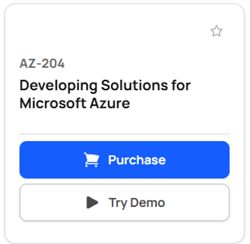
A demo test will launch with five questions and full configuration options, allowing you to explore the experience.
If you decide to purchase the full version, click the Purchase button in the same product tile. You’ll be redirected to the MeasureUp store where you can choose your preferred subscription period.